Client Type
Small and medium-sized business managing shift-based teams
Industry Use Cases:
Staffing agencies, healthcare providers, field service companies, security teams, logistics operations, and other businesses that rely on accurate workforce scheduling.
Overview
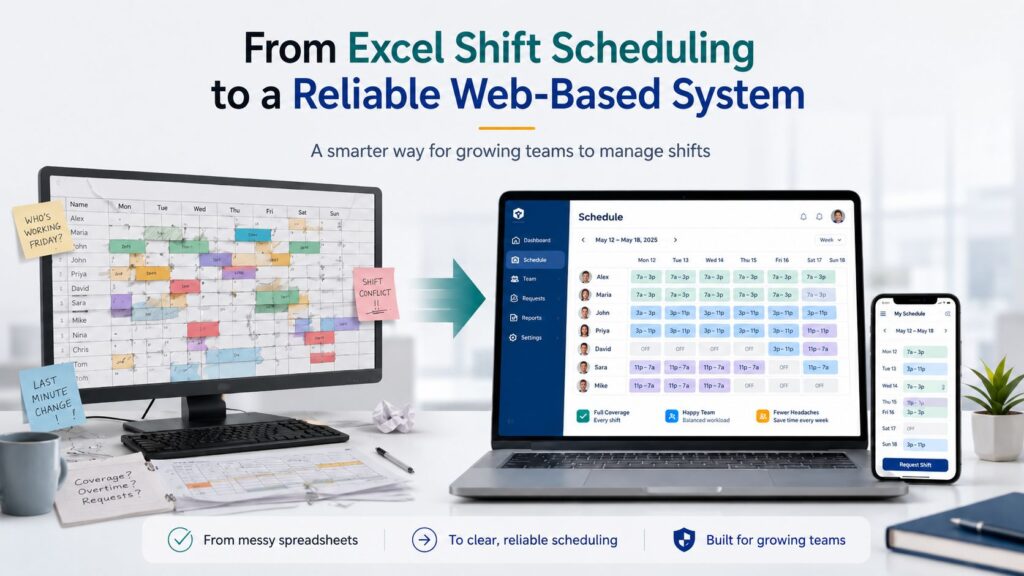
Many growing businesses begin their operations using Excel for shift scheduling. It is familiar, flexible, and easy to start with. However, as team size increases and scheduling becomes more complex, Excel often creates more problems than it solves.
In this case, the client was managing staff schedules through multiple spreadsheet files, manual updates, phone calls, WhatsApp messages, and emails. What worked in the early stages had become a major operational bottleneck.
To solve this, we helped the business move from a spreadsheet-based process to a centralized web-based shift scheduling system designed for accuracy, visibility, and scalability.
The Challenge
The client’s scheduling process depended heavily on Excel. Managers had to manually update shifts, track staff availability, resolve conflicts, and communicate changes across different channels.
As the business grew, the process became increasingly difficult to manage.
Key Problems
The client was facing several operational challenges:
- Frequent formula errors and broken spreadsheet logic
- Multiple file versions causing confusion among managers and staff
- No real-time visibility into staff availability
- Risk of double-booking employees or leaving shifts uncovered
- Last-minute schedule changes being handled manually
- Time wasted coordinating through calls, WhatsApp, and emails
- Limited access for staff when they were away from a computer
- Lack of accountability around shift updates and confirmations
Because of these issues, managers were spending more time fixing schedules than focusing on daily operations, staff performance, and business growth.
Why Excel Was No Longer Enough
Excel is useful for simple planning, but shift scheduling requires more than rows, columns, and formulas.
Growing teams need real-time updates, conflict prevention, mobile access, clear communication, and a reliable system of record. Excel does not naturally support these needs without heavy manual work.
For this client, Excel created hidden inefficiencies that affected productivity, communication, and operational confidence.
The business needed a system that could support growth instead of slowing it down.
The Solution
We replaced the spreadsheet-based workflow with a centralized web-based shift scheduling system tailored to the client’s operational needs.
The new platform gave managers and staff one reliable place to view, update, and manage schedules.
Key Features Implemented:
- Centralized Scheduling Dashboard: One centralized system instead of multiple Excel files
- Real-Time Shift Scheduling: Instant updates for managers and staff
- Conflict Prevention: Built-in checks to avoid overlapping shifts
- Staff Availability Visibility: Quickly check employee availability and assign shifts with more confidence
- Mobile-Friendly Access: Staff can view schedules anytime, anywhere
- Simplified Communication: Reduced manual intervention and repetitive tasks
- Scalable Workflow: Support future business growth, including more employees, more shifts, and more complex scheduling needs
The Results
After implementing the web-based shift scheduling system, the client experienced immediate improvements in daily operations.
Operational Improvements
- Significant reduction in scheduling errors
- Faster shift planning and schedule updates
- Better visibility into staff assignments
- Improved team coordination and transparency
- Reduced administrative workload for managers
- Fewer last-minute communication issues
- More confidence in schedule accuracy
- A more professional and scalable scheduling process
The new system gave managers better control and gave staff easier access to the information they needed.
Business Impact
The transformation helped the client move from a reactive scheduling process to a more organized and reliable workflow.
- Save hours every week on manual scheduling
- Eliminate confusion caused by multiple spreadsheet versions
- Improve workforce efficiency and accountability
- Focus more on core business operations instead of admin work
Before and After
Before
- Multiple Excel files
- Manual updates
- Risk of double-booking
- Calls and WhatsApp coordination
- Limited visibility
- Time-consuming admin work
- Difficult to scale
After
- One centralized scheduling system
- Real-time schedule changes
- Built-in conflict prevention
- Clear digital schedule access
- Manager and staff access anytime
- Streamlined scheduling workflow
- Ready for business growth
Why This Matters for SMBs
Many SMBs continue using Excel because it feels convenient and familiar. But as scheduling needs grow, Excel can quietly create operational problems.
Businesses that rely on shift-based teams need accuracy, speed, and visibility. Without the right system, small scheduling mistakes can lead to missed shifts, unhappy staff, delayed operations, and frustrated managers.
A web-based scheduling system helps SMBs move from manual coordination to structured workforce management.
Still managing staff schedules in Excel?
It may be costing your business more time, accuracy, and efficiency than you realize.
A custom web-based scheduling system can help you reduce errors, improve team coordination, and build a smoother workflow for your growing business.