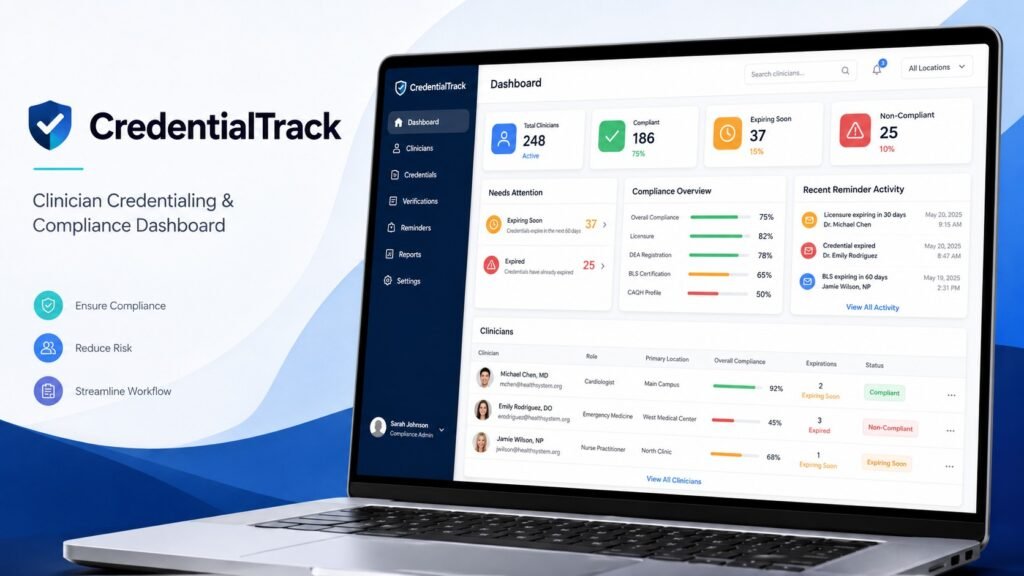
A compliance dashboard designed to make credential tracking simpler, clearer, and easier to act on
Overview
CredentialTrack is an designed around a common operational challenge in healthcare: keeping clinician credentials organized, current, and easy to monitor.
When credential information is spread across spreadsheets, emails, and disconnected records, teams can spend unnecessary time checking expiration dates, following up manually, and trying to understand who needs attention.
I built CredentialTrack to bring that workflow into one centralized system. The application gives teams a clear view of clinician compliance, upcoming expiration, overdue credentials, and reminder activity so they can identify issues quickly and take action before they become larger problems.
The Business Challenge
Credential and compliance teams need to answer important questions quickly:
- Which clinicians are currently compliant?
- Which credentials are approaching expiration?
- Which records require immediate follow-up?
- Have reminders already been sent?
- Where should the team focus its attention first?
When this information is managed manually, even simple questions can require checking multiple records or maintaining complicated spreadsheets.
CredentialTrack was designed to make those answers visible from one place and reduce the amount of manual tracking required.
My Role
I designed and developed CredentialTrack end-to-end, covering both the technical implementation and the user experience.
My work included:
- translating the compliance workflow into an application structure
- designing the clinician, credential, and reminder data relationships
- developing the application with Django
- building forms, views, routing, and business logic
- creating the dashboard and supporting management screens
- designing the interface with custom HTML and CSS
- improving the frontend architecture for consistency and maintainability
- refining the dashboard around the information users need most often
This allowed me to approach the project as both an engineering problem and an operational workflow problem.
The Solution
CredentialTrack provides a centralized workspace where a team can manage clinicians, review credentials, identify upcoming expirations, and track reminder activity.
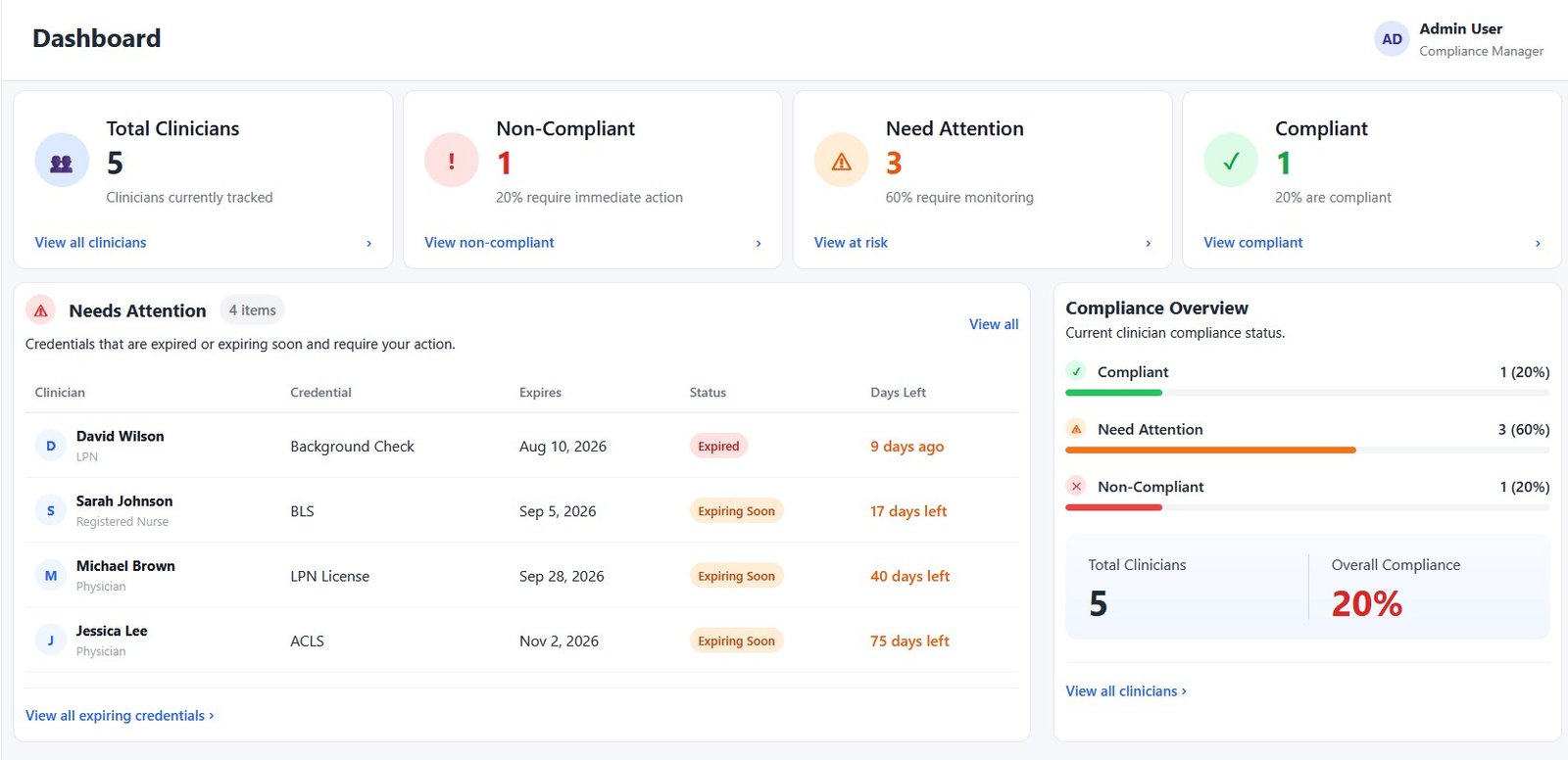
The dashboard acts as the main operational view. Instead of requiring users to search through individual records, it brings the most important information forward immediately.
Users can quickly see:
- overall compliance status
- clinicians or credentials that need attention
- upcoming expirations
- recent reminder activity
- compliance progress across the organization
From there, they can move directly into the relevant clinician or credential record to review or update the underlying information.
Key Capabilities
Compliance at a Glance
Dashboard summary cards provide an immediate snapshot of credential status, helping teams understand their current compliance position without manually reviewing individual records.
Prioritized Follow-Up
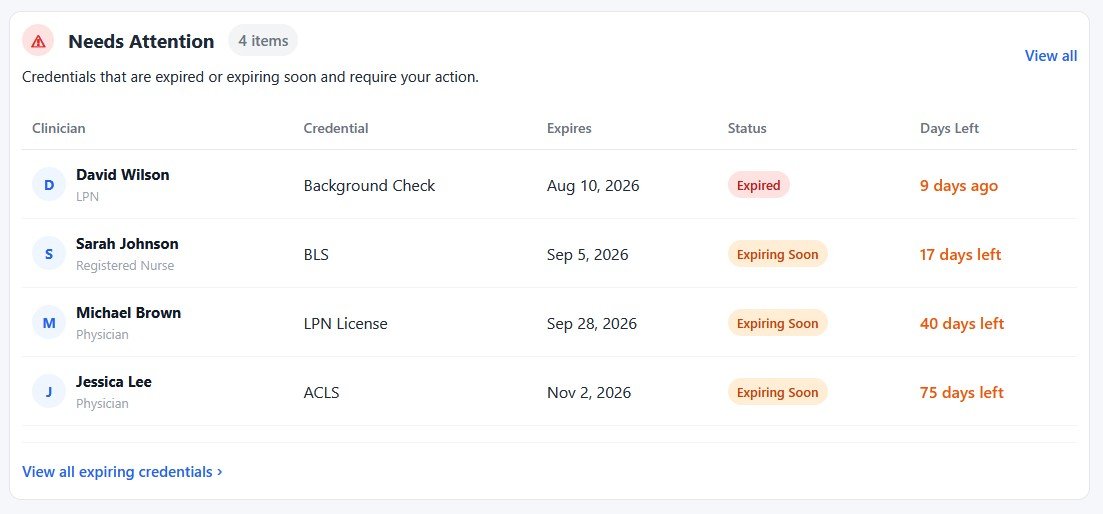
The Needs Attention section highlights expired and soon-to-expire credentials so users can focus on the records that require action first.
Expiration Tracking
Credentials can be organized by expiration window, making it easier to plan ahead instead of discovering expired documentation after the fact.
Clinician-Level Visibility
Each clinician can be reviewed individually along with their related credential records, providing a clear picture of their overall compliance status.
Reminder Tracking
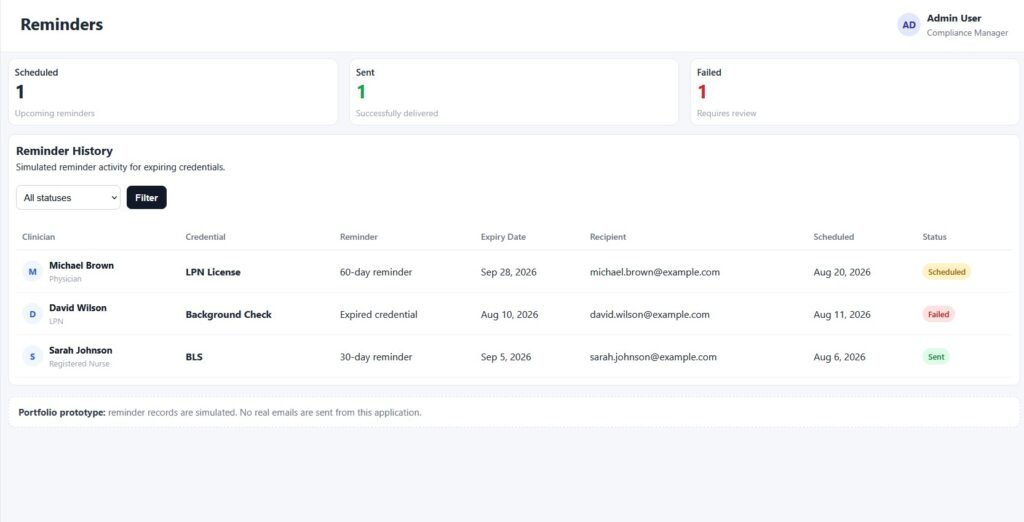
Reminder records show scheduled, sent, and failed states, giving teams visibility into what communication has already taken place.
Configurable Reminder Preferences
A settings area supports reminder preferences so the workflow can be adapted to different operational requirements.
Turning Credential Data Into Actionable Status
One of the most important parts of the application is the logic behind the dashboard.
CredentialTrack evaluates credential expiration information and translates it into meaningful compliance states such as:
- Compliant — required credentials are currently valid
- Needs Attention — a credential is approaching expiration
- Non-Compliant — a credential has expired or requires immediate action
Instead of presenting users with raw dates alone, the system turns those dates into clear visual indicators, filtered views, progress information, and priority lists.
This makes the application more useful for day-to-day operations because users can understand what requires attention without interpreting every record manually.
What CredentialTrack Could Help a Business Improve
A system built around this approach can help organizations:
- reduce reliance on manual spreadsheets
- identify expiration risks earlier
- create clearer ownership around follow-up
- improve visibility across clinician records
- reduce repetitive status checking
- maintain a more organized credential history
- give managers a faster view of overall compliance
- create a foundation for automated reminder workflows
The same dashboard-driven approach could also be adapted for other time-sensitive operational workflows involving licenses, certifications, contracts, training requirements, or employee documentation.